 MyBudget2U
Budget & expense tracker
Know where your money actually went.
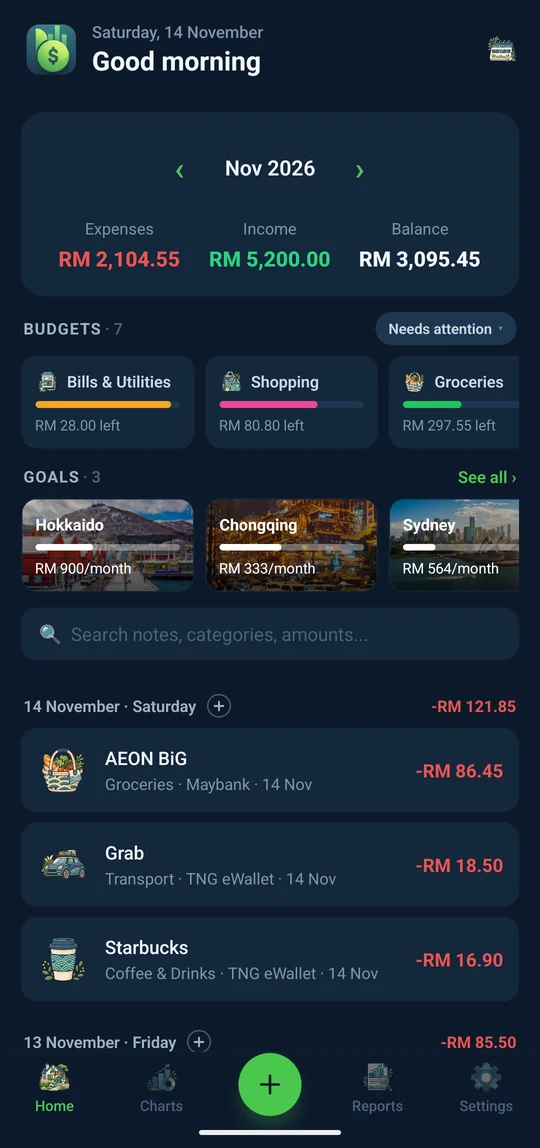
MyBudget2U logs your spending, keeps you inside your budgets and shows the month at a glance. No ads, no sign-up, and it works offline. Your budget stays on your phone.
Log without typing
Your bank tells you what you spent. MyBudget2U writes it down.
- ✓Bank and e-wallet alerts. Tap the MyBudget2U alert and the payment is logged with the right shop and amount.
- ✓Share a receipt screenshot. The amount and shop are read right on your phone.
- ✓You choose the apps. Works with Maybank2u, CIMB, Touch 'n Go and 30+ Malaysian banks and wallets. Login codes and messages are never kept.

Everything a month needs
Budgets, goals and charts in one calm place.
Budgets that warn you before you overspend
Set a monthly limit per category. MyBudget2U tells you at 80% and when you go over, so payday isn't a surprise.
Goals you can see growing
Save for a trip or an emergency fund, month by month.
Widgets on your home screen
See today's spend, what's safe to spend, or add an entry without opening the app.
Bills that remind you
Repeat your rent, salary and subscriptions. Get a reminder before a bill is due, with an UNPAID tag until you pay.
Backup to your own Google Drive
One-tap backup and restore. Export everything to a file any time, on every plan.
Made for your language and your money
18 languages and live exchange rates when you spend abroad.
New for Pro
Your budget on a big screen.
Pro members can open their budget on any computer at mybudget2u.com. You keep adding entries on your phone. The web viewer is for reading reports, charts and history in comfort.
- Turn on View on the web in the appSettings → Google Drive Backup. Your phone keeps a fresh copy in your own Drive.
- Sign in here with the same Google accountThe web viewer opens that copy right inside your browser.
- Browse months, charts and transactionsEverything is view-only, so nothing on your phone can change by accident.
Private by design
We never see your budget.
No account is needed to use MyBudget2U. The web viewer reads your backup from your own Google Drive straight into your browser. It never passes through our servers.
Stays with you
- Every entry, category, budget and goal, on your phone
- Backups in your own Google Drive, in a hidden folder only MyBudget2U can open
- Receipt photos, unless you choose to back them up
What we receive
- Purchases, through Google Play and RevenueCat, to unlock Pro
- A payment alert your phone can't read, only if you turn on payment alerts. It's read once and its text isn't stored
- For the web viewer: an ID that lets us confirm your Pro status. Never your entries or amounts
- No ads and no ad trackers
Pricing
Free for everyday budgeting.
Free
- Unlimited transactions
- Budgets and alerts
- Up to 3 accounts, 5 custom categories, 3 goals
- 5 monthly repeats, 10 receipt scans a month
- Charts and monthly reports
- Export and import, always
- Two themes and two icon packs
MyBudget2U Pro
PRO50% off for new subscribers
- Web viewer at mybudget2u.com
- Unlimited receipt scans
- Unlimited accounts and categories
- Unlimited and weekly repeats
- Bill reminders
- Automatic Drive backup
- Spending in other currencies
- All 6 themes and 7 icon styles
- Unlimited goals
Get Pro inside the app on Google Play. Still no ads, on any plan.
Help
Questions people ask
Can I add or edit entries on the website?
Not yet. The web viewer shows your budget but doesn't change it. Add and edit on your phone, and the web catches up the next time your phone saves its web copy.
How fresh is what I see on the web?
The viewer shows your latest web copy and tells you when it was made. With Pro and View on the web turned on, your phone refreshes that copy each time you leave the app, if anything changed.
Is there an iPhone version?
It's being built. Join our Discord to hear first.
I changed phones. How do I get my data back?
Install MyBudget2U, open Settings → Google Drive Backup, sign in with the same Google account and tap Restore.
How do I cancel Pro?
In Google Play → Payments & subscriptions. Lifetime Pro never needs cancelling.